What You Can Ask Luna
Not sure what to ask? You can ask Luna questions the same way you'd ask a coworker who knows Asset Panda really well. Here are some ideas to get you started. (Replace the group names in these examples with your own, such as Laptops or Vehicles.)
Ask About Your Own Data
Luna can look up information in your account and do the math for you.
- "How many Laptops do we have?"
- "Give me a breakdown of Laptops by status."
- "Show me the 5 most recently created Laptops."
- "Find the record for John Smith." (Luna searches every group and tells you where it lives.)
- "How many groups do I have, and how many records are in each?"
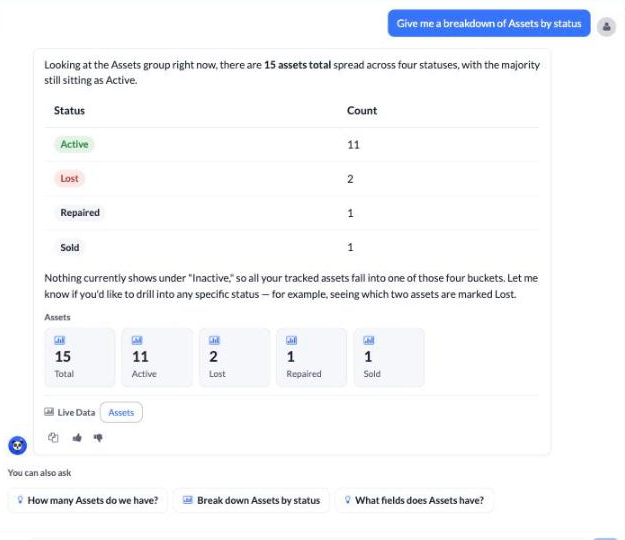
Ask About a Record
Open a record, and then ask Luna about it. She'll know which record you're viewing.
- "What changed on this record recently?"
- "Has any action been performed on this record?"
- "Were any notifications sent for this record?"
Ask About How Your Account Is Set Up
- "What fields does the Laptops group have?"
- "What actions are available on Laptops?"
- "What statuses does this group use?"
- "What reports and dashboards do I have?"
- "What integrations do I have connected?"
- "What can I do in this group?" (Luna tells you which things you have permission to do.)
Ask How Asset Panda Works
Luna searches the Asset Panda help center to answer how-to questions, and she links you to the articles she used.
- "How do I add a custom field to a group?"
- "How does depreciation work?"
- "What's the difference between a saved filter and a report?"
- "How do I schedule an audit?"
Ask About the API
If you're building an integration, Luna can search the Asset Panda API documentation for you.
- "How do I authenticate to the Asset Panda API?"
- "What's the endpoint to search for records in a group?"
Search the Web
Luna can also search the web for things related to the assets you manage, such as finding a replacement for a piece of equipment, comparing prices from retailers, or researching a vendor.
- "Where can I buy a replacement charger for a Dell XPS 13?"
- "What are some good laptops for office use?"
When you ask about buying something, Luna looks for retailers in your region and shows prices in your local currency where possible. Include details like the make, model, or what you plan to use it for to get better results. Note that prices and availability can change, so always confirm them on the retailer's site. Luna's web search is limited to topics related to managing your assets, so she can't help with general questions like sports scores or the weather.
Tips for Getting Great Answers
- Be specific. Name the group, field, or record you're curious about, or open it first so Luna can see it.
- Say what kind of answer you want. Ask "How do I...?" to learn how Asset Panda works, or ask "How many...?" or "Which...?" to look up your own data.
- Ask follow-up questions. Luna remembers the conversation, so you can say things like "Now break that down by location."
- Use your group names. Luna understands the way you talk about your data. Asking about "laptops" means the records in your Laptops group.
- Give feedback. A quick thumbs up or thumbs down helps us improve Luna.
What Luna Can't Do (Yet)
- For now, Luna is available in the Asset Panda web app only, not in the mobile apps. We're working on a mobile version.
- For now, Luna is read-only. She can't add, edit, check out, or delete records or change your settings. We're working on this.
- Luna can explain how calendars, audits, billing, reservations, barcode scanning, and import templates work, but she can't look up your live data for them (for example, "How many audits do we have?" or "What's my current bill?").
- Luna only shows information you have permission to see.
If Luna can't help with something, she'll tell you. You can always use the Talk to a Human button to reach our support team. See Meet Luna, Your AI Assistant for details.
Related Topics