Turn Luna On or Off
Once Luna is enabled for your account, she's on by default. If you'd rather not have the AI assistant available, your company administrator can turn her off (and back on again) at any time. Note that this setting applies to everyone in your account.
1. Click to select your settings  icon, and then select Company Settings.
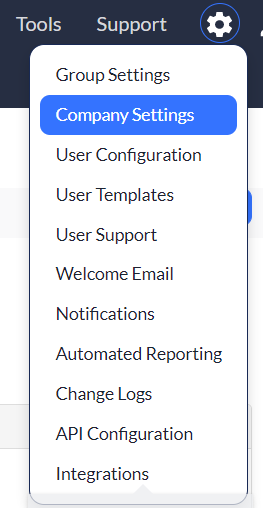
2. Scroll down to the AI Chatbot Options section.
3. In the Would you like to enable the AI Chatbot for your account? drop-down, select Yes to turn Luna on or No to turn her off.

4. Click Save Options.
When Luna is turned off, the Luna button no longer appears for any user in your account. Your past conversations aren't shown while Luna is off, but they're there again when you turn her back on. Turning Luna off doesn't delete any conversations or attached files.
Note that you must be an administrator to change this setting. If you don't see the AI Chatbot Options section, please contact Asset Panda support.
Related Topics